Setup
CS2 Cheats First Night Setup | From $35
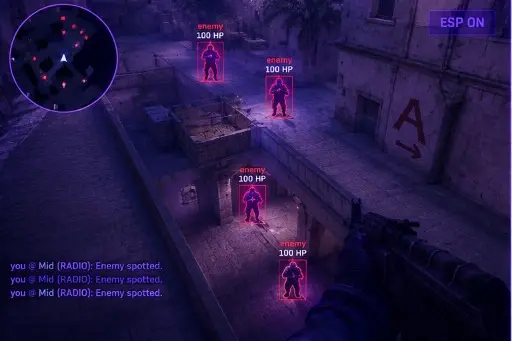
The first evening decides how the next month feels. Follow this order from delivery email to a calm first launch — the Cheats CS2 product includes ESP, aim controls, and loader help with instant digital delivery after checkout.
Read the Delivery Message Carefully
After checkout you will receive a message containing your access details. Read all of it once, slowly. It tells you which file to use, which plan you bought, and where to go if something does not work. Skipping it is how people end up downloading something from the wrong place.
Only use files that come from that message or from your account page. Files passed around in chat groups, forum threads, or from strangers are a common way accounts and computers get compromised, and no support team can undo that.
Confirm Your Plan and Access Period
Check which plan you bought and when it starts. A monthly plan runs for a fixed period, while a lifetime plan removes the day counter. Knowing this avoids confusion later when a counter appears or a renewal question comes up.
Keep the order email somewhere you can find it. If you ever need help, support will ask for the order details first, and having them ready saves a round of back-and-forth.
Finish Windows and Driver Updates
Before launching anything new, let Windows finish its pending updates and restart. A half-installed update can cause odd behavior that looks like a software problem but is really a system in transition.
While you are there, update your graphics driver from the manufacturer. Our Windows Pre-Launch Checklist has a longer list of system checks, including startup items and background processes, that are worth doing once now rather than during a troubleshooting session later.
Run the Game Once on Its Own
Open CS2 without anything else, load into a practice map, and confirm it runs smoothly. This gives you a clean baseline for frame rate, latency, and stability. If the game itself is not stable, no extra software will fix that.
Note your resolution, window mode, and typical frame rate. If something looks wrong later, you can compare against this baseline and know whether the change came from the game or from what you added.
Open the Menu for the First Time
With the game running on a practice map, follow the steps in your delivery message to open the menu. The default key is Insert, and on many laptops that key sits behind a function layer. If nothing happens, do not reinstall anything yet; follow Insert Key Not Working? first.
Once it opens, look around without changing anything. Read the tab names, read the tooltips, and close it again. Getting familiar with the layout before touching sliders prevents accidental changes you cannot remember making.
Change One Setting at a Time
It is tempting to switch on everything. Resist that. Change one thing, test it on a practice server, and note the result. If a problem appears, you know exactly which change caused it.
Save a profile when you reach something that feels good, and give it a clear name. Future you will be grateful when you can reload it with a single click instead of trying to remember what you did on the first night.
First Night Checklist
Use this as a final pass before you call it done.
- Delivery message read and the correct file identified.
- Plan type and start date confirmed.
- Windows updates and graphics drivers current.
- CS2 tested on its own and stable on a practice map.
- Menu opened once and the layout reviewed.
- One change at a time, with a named profile saved.
- You understand that competitive services prohibit this software.
Why buyers use the Cheats CS2 product
The Cheats CS2 product hub bundles ESP, aim controls, radar overlay, and saved configs for Windows 10 and 11 FACEIT-oriented lobbies. Status is updated after Counter-Strike 2 patches, delivery is digital after checkout, and support is available 24/7.
Which plan fits you
Monthly access is $35 for 31 days; lifetime access is $150 with no day counter on the plan. Compare both on pricing and plans before you checkout.
Delivery, support, and policies
Orders deliver by email with a download link and loader notes. If something fails to load, use support with your order ID. Refund rules are in the FAQ and terms. First-time setup help lives in the setup forum.
Quick answers before you buy
How much do CS2 cheats cost?
Plans start at $35 monthly or $150 lifetime on the product pricing section. Confirm live status before checkout.
How fast is delivery?
Delivery is digital: after payment you receive email with access details, usually within minutes on a normal order.
Does it run on my PC?
The build targets Windows 10 and 11. Check requirements and HVCI notes on the product page before you buy.
Ready to compare modules and plans?
Starts at $35