Visuals
ESP CS2 intérieur FACEIT (guide + tarifs)
L'ESP encombre vite les intérieurs. Ce guide couvre box, santé et squelette — et le produit Cheats CS2 regroupe ESP, radar et aim pour lobbies FACEIT.
Voir le produitVoir les tarifs
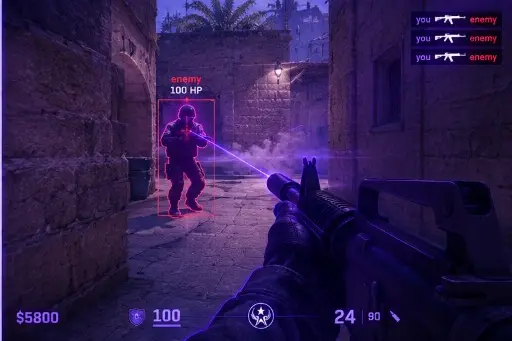
What ESP Overlays Actually Are
An ESP overlay is a set of graphics rendered over the game window that marks information the game itself would not show you in that way. Boxes, name tags, distance text, and skeleton lines are all examples. They are drawn by separate software, not by the game, which is why they depend on staying compatible with each game build.
Because they sit on top of the normal image, readability matters as much as the feature itself. An overlay that is technically working but visually noisy makes you slower, not faster, which is the opposite of what most people want when they enable it.
Boxes: The Simplest Overlay
Boxes are the plainest option: a rectangle around a player model. They are easy to parse at a glance because the shape is predictable. Thin outlines in a high-contrast color read better than thick filled shapes, especially against busy textures.
Indoors, boxes can overlap when several players stand close together. Keeping line weight low and avoiding fills keeps the scene legible. If boxes stack into a solid block on a narrow stairwell, the setting is working against you.
Health Bars and Text Information
Health indicators add a second layer: a thin bar or number next to the box. They are useful only if they are small and consistent. Large, animated, or multi-colored bars pull your eyes away from the crosshair and make the screen feel crowded.
Text elements like names and distance behave the same way. Show only what you will actually read in the moment. Our Patch Day Status article also notes that text layouts are one of the first things to look off after a game update, so a quick visual check after any patch is sensible.
Skeleton Overlays and Visual Clutter
Skeleton overlays draw a line figure over the player model. They can be informative but are also the busiest option. In small rooms with several models, a skeleton for every player turns the image into a diagram and hides the detail you are trying to read.
A practical rule is to treat skeleton lines as a situational choice and not a default. Many people prefer to leave them off in cramped indoor areas and keep simpler elements active. Whatever you choose, test it in a safe environment first so you are not judging legibility during a live round.
Performance and Compatibility
Every extra element has a cost. More drawing means more work per frame, and weaker systems can notice it as a small frame-time bump. Keep your overlays lean and watch your frame rate after changing anything.
Compatibility is the other half. An overlay that worked yesterday can behave oddly after a game or driver update. If drawing looks misaligned or missing, check the status first rather than adjusting settings blindly, and read Understanding aim assistance FOV for how visual and input features differ in how they are treated by communities and moderators.
Rules, Moderation, and Account Risk
Using overlays that reveal information in matchmaking, FACEIT, or any organized event violates the terms of those services. Enforcement can include permanent bans, loss of inventory access, and removal from leagues. Overwatch-style community review and demo checks also exist, and unusual play can attract attention regardless of tools.
We do not provide methods for avoiding detection, and nothing in this article guarantees safety. If you choose to experiment, do so understanding that you can lose an account. Keep it away from lobbies where rules are enforced, and never use it in a way that harms other players' experience in organized play.
Quick Review Checklist
Before you close the menu, run through these items.
- Boxes use thin outlines with a high-contrast color.
- Health bars and text are small and consistent.
- Skeleton lines are off or limited in cramped indoor areas.
- Frame rate stays steady after your changes.
- The status label matches the current game build.
- You have read the rules for any service you play on.
Pourquoi les acheteurs choisissent Cheats CS2
La page produit regroupe ESP, réglages d'aim, overlay radar et profils pour Windows 10 et 11 en lobbies FACEIT. Statut mis à jour après les patchs CS2, livraison numérique, support 24h/24.
Quelle formule choisir
Mensuel : 35 $ pour 31 jours ; à vie : 150 $ sans compteur. Comparez sur tarifs et formules.
Livraison, support et règles
Commande par e-mail avec lien de téléchargement. En cas de blocage : support avec n° de commande. Remboursements : FAQ et conditions. Setup : forum.
Réponses rapides avant achat
Quel prix pour les cheats CS2 ?
À partir de 35 $/mois ou 150 $ à vie — tarifs produit. Vérifiez le statut avant paiement.
Délai de livraison ?
Livraison numérique par e-mail, en général en quelques minutes.
Compatible avec mon PC ?
Windows 10 et 11. Voir les prérequis sur la page produit.
Prêt à comparer modules et formules ?
À partir de 35 $