Map Knowledge
Radar auf Nuke + CS2 ESP Produkt
Nuke ist vertikal und das Radar täuscht. Dieser Guide nutzt das legitime Radar — und wie das Cheats-CS2-Produkt ESP und Radar-Overlay für FACEIT ergänzt.
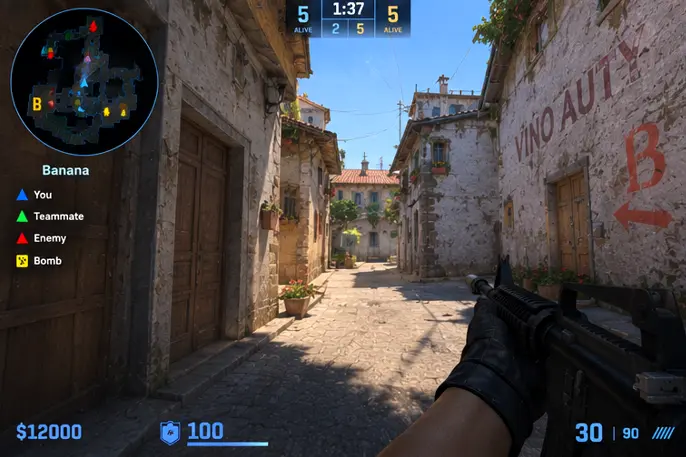
What the Built-In Radar Shows
The default radar displays your position, your teammates, and the information the game allows you to see: objectives, the bomb, and enemies spotted by your team. It is deliberately limited. Understanding exactly what it does and does not show prevents false assumptions.
Spend a round in a practice server watching the radar without worrying about anything else. Note how quickly dots update, how spotted enemies appear and fade, and how the bomb icon behaves during a plant.
Upper and Lower Levels
Nuke stacks its sites vertically, so the radar switches between views depending on where you are. When the map shows the lower level, the upper floor is hidden, and the reverse. Teammate dots on the other level can look misleading if you forget which view you are in.
Always check which level the radar is showing before you call a position. A teammate in Vents might look like they are standing inside the outside area on a single-layer view.
Teammate Dots and Spotted Enemies
Teammate dots tell you where your support is. If your team has clustered in one place, you know the rest of the map is thin. Spotted enemies appear because someone on your team sees them, so a sudden dot means somebody has eyes there, not that the map is revealed.
Use the information to ask better questions. Instead of saying someone is somewhere, ask your teammate what they saw and from where. Short, specific voice lines beat long speculation.
Pairing Radar With Sound
The radar is strongest when combined with audio. Footsteps, ladders, doors, and bomb sounds fill in what the dots cannot. Nuke is especially audio-heavy because of its metal surfaces and vertical shafts.
Train yourself to glance at the radar after hearing something, not constantly. Over time, the pairing becomes automatic and you spend more attention on your crosshair.
Callouts That Keep Teams in Sync
A shared vocabulary is half the value. Learn the standard callouts for outside, ramp, heaven, hut, and the lower areas. Use the same names every time so teammates do not have to translate.
Practice relaying radar information in a short format: where, how many, and what you are doing next. This is the same discipline described in FACEIT Lobby Prep under communication.
Practicing Without Shortcuts
The best way to improve is to play maps in practice servers, watch your own demos, and review pro matches. Keep your practice honest: the goal is understanding the map, not seeing more than the game intends.
Using software to reveal additional radar information in matchmaking or organized play breaks the rules and risks your account. We cover the broader subject in Understanding aim assistance FOV from an educational angle.
Radar Reading Checklist
Run through this list in a practice server before your next Nuke session.
- You know which level the radar is currently showing.
- You check teammate spacing before committing.
- You pair every radar glance with audio cues.
- You use standard callouts consistently.
- You relay where, how many, and what next.
- You review your demos after each session.
Warum Käufer das Cheats-CS2-Produkt nutzen
Im Produkt-Hub findest du ESP, Aim-Regler, Radar-Overlay und gespeicherte Configs für Windows 10 und 11 in FACEIT-Lobbys. Der Status wird nach CS2-Patches aktualisiert, die Lieferung ist digital, Support ist 24/7 erreichbar.
Welcher Plan passt
Monatlich kostet 35 $ für 31 Tage, Lifetime 150 $ ohne Tageszähler. Vergleiche beides unter Preise und Pläne.
Lieferung, Support und Richtlinien
Bestellungen kommen per E-Mail mit Download-Link und Loader-Hinweisen. Bei Ladefehlern: Support mit Bestell-ID. Rückerstattung steht in FAQ und AGB. Ersteinrichtung: Setup-Forum.
Kurze Antworten vor dem Kauf
Was kosten CS2 cheats?
Ab 35 $ monatlich oder 150 $ Lifetime — siehe Preise. Status vor dem Checkout prüfen.
Wie schnell ist die Lieferung?
Digital per E-Mail, meist innerhalb weniger Minuten nach Zahlung.
Läuft es auf meinem PC?
Für Windows 10 und 11. Anforderungen auf der Produktseite lesen.
Module und Pläne vergleichen?
Ab 35 $